Reviews that live where your team works
ProofNow works inside monday.com and the Adobe apps your designers open every day. Figma, Canva, Asana and more are on the way.
Where you create
 Figma
Figma Canva
Canva Photoshop
 InDesign
 Illustrator
 Premiere Pro
 After Effects
Where your team works
 monday.com
 Asana
Asana Slack
Slack Microsoft Teams
 Google Drive
 Dropbox
 Zapier

monday.com: approvals on the board you already use
ProofNow adds a review step to every item. Your board stays the single place to see what is done, what is in review and what still needs changes.
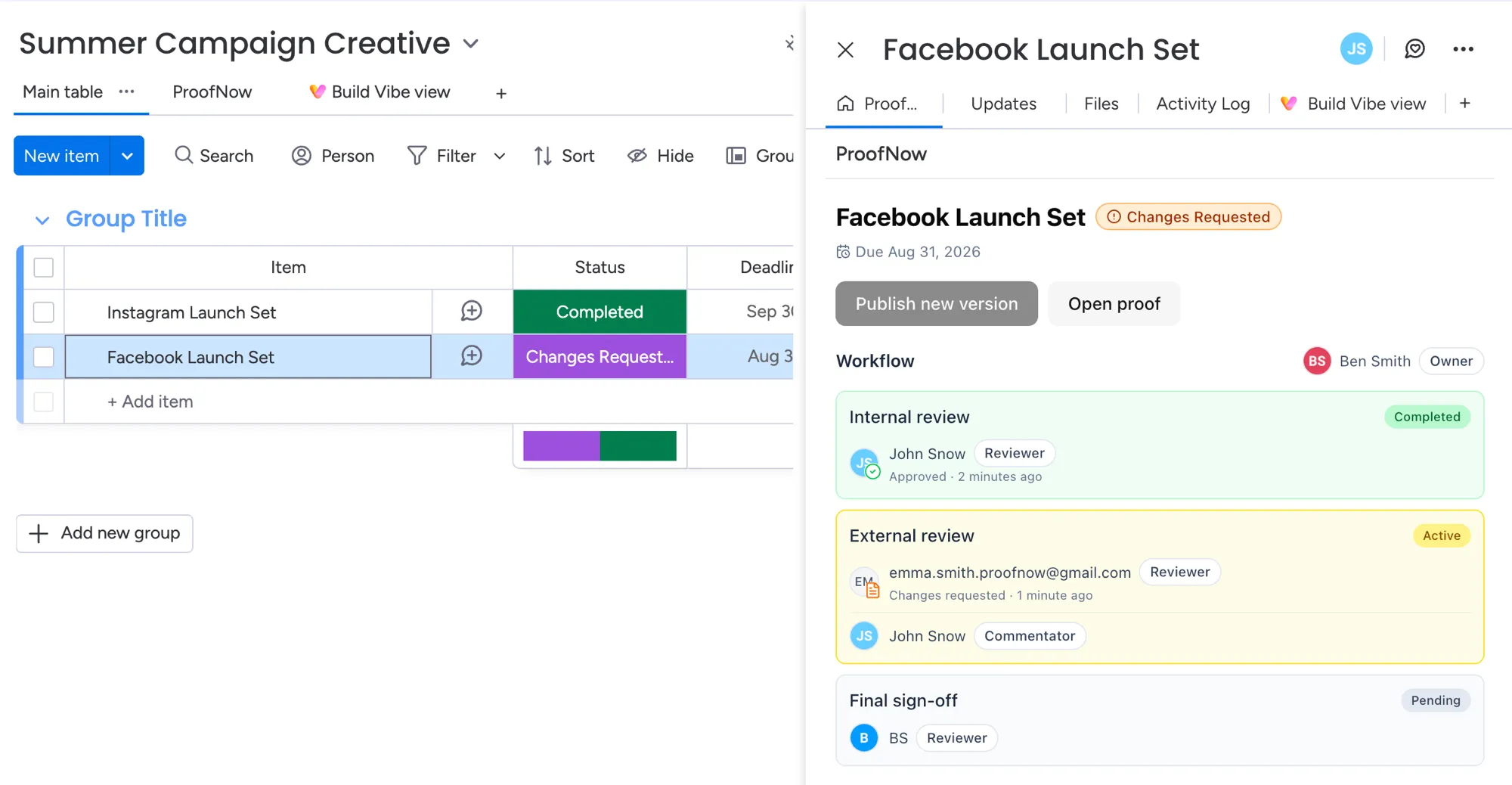
Proofs inside your items
See review stages, reviewers and every decision in the item, next to the rest of the work.
Your board updates itself
Status, due date and current review stage are kept up to date on the board as reviews move on.
Start from files you already have
Turn files on an item into a proof, or publish the next version, in a couple of clicks.
The same review steps every time
Save your review workflow once and reuse it for every new proof on the board.
Ask monday Sidekick
Ask where a proof stands or what reviewers said, or start a review, without leaving the chat.
Reviewers don’t need monday.com
Clients review in their browser through a link. No account or seat needed.

Adobe: send work for review without leaving the app
A ProofNow panel inside five Adobe apps. Designers send a new version in one step and read every comment right next to their work.
Photoshop
Send a design for review and see the reviewer’s markup drawn on your image.
Version 23.3 or laterInDesign
Send every page of a layout and jump to the page each comment is on.
Version 18.5 or laterIllustrator
Send all your artboards at once and jump to the one a comment is about.
Version 29.5.1 or laterPremiere Pro
Export your sequence for review and jump to the exact moment of each comment.
Version 25.6 or laterAfter Effects
Render your composition for review while you keep working.
Version 25.0 or later
Works with everyone else, too
Clients, freelancers and colleagues outside your tools can still take part in every review.
Review links for clients
Anyone can comment, mark up and approve in their browser, without an account.
Email invites and reminders
Reviewers hear when it’s their turn, and get a gentle nudge before the deadline.
Any file, any website
Upload designs, documents and video from your computer, or review a website from its link.
Coming soon
We’re building these next, so reviews can start wherever your team designs, plans and talks.
- Coming soon
Figma
Design
Send frames for review straight from Figma and see the feedback next to your design.
- Coming soon
Canva
Design
Send a Canva design for approval and bring the comments back while you edit.
- Coming soon
Asana
Project management
Attach proofs to tasks and see where each approval stands from your Asana projects.
- Coming soon
Slack
Team chat
Get review requests, new comments and approvals in the channels your team already reads.
- Coming soon
Microsoft Teams
Team chat
Keep colleagues and clients up to date on reviews in your Teams chats.
- Coming soon
Google Drive
Files
Start a proof from a file in Google Drive, without downloading it first.
- Coming soon
Dropbox
Files
Pick a file from Dropbox for review and save the approved version back.
- Coming soon
Zapier
Automation
Connect reviews to thousands of other apps, from CRMs to spreadsheets, without writing code.
Use a tool that isn’t here?
Tell us what you use and how reviews should fit in. Requests from teams decide what we build next, and we’ll let you know when it’s ready.
Integration questions
Do integrations cost extra?
Do my clients need monday.com or Adobe to give feedback?
Which Adobe apps work with ProofNow?
When will Figma, Canva and Asana be available?
Can I ask for an integration that is not listed?
Bring every review into the tools you already use
Add ProofNow to monday.com, connect your Adobe apps and send your first proof today.